
 Tiếng Việt

Record Accurate Packing Videos on iPhone. Reduce Disputes. Protect Every Order.
E-commerce sellers on Shopee, TikTok Shop, Lazada, Tiki, and Shopify increasingly rely on video proof during order fulfillment. Many sellers now search for reliable iPhone packing video apps, because iOS devices are known for their stable camera quality and smooth performance.
This guide introduces SwiftTrack for iPhone — a dedicated iOS packing video app designed for warehouses and online brands needing high-quality, AWB-linked packing videos.
Why Use an iPhone for Packing Videos?


iPhones running iOS 15 and above offer several advantages in warehouse environments:
-
Consistent video quality
-
Fast auto-focus
-
Excellent low-light performance
-
Stable recording with long sessions
-
Strong WiFi/4G connectivity
-
Reliable file handling
For operations where video evidence matters, the iPhone is one of the best devices to ensure clarity and reliability.
SwiftTrack takes advantage of all of these strengths to deliver the most stable and accurate packing video workflow.
What Is SwiftTrack for iOS?
SwiftTrack is a packing video recording app built specifically for iPhone and iPad (iOS 15+).
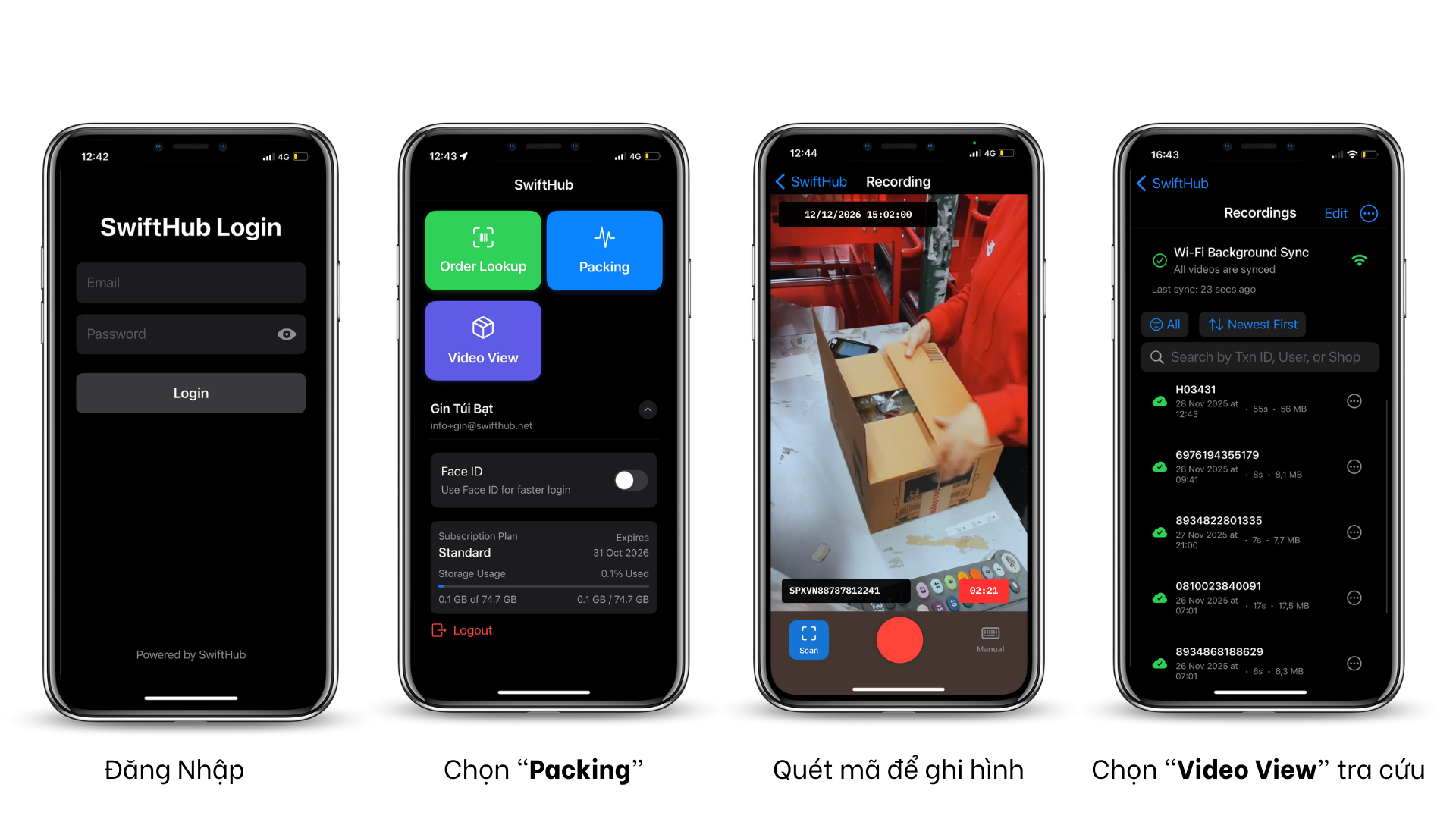
The app automatically records the packing process and attaches the video to the order’s AWB code. This allows support teams to retrieve any video instantly during a dispute or investigation.
Unlike using the iPhone’s default Camera app, SwiftTrack organizes everything automatically, ensuring videos never get mixed or lost.

Sign in with Apple to start using the service completely free, unlocking instant access without any extra steps and allowing you to enjoy all features seamlessly from the very first moment
Key Features of SwiftTrack for iPhone
1. AWB-Linked Video Recording

Simply scan the AWB code using the iPhone camera. SwiftTrack instantly starts recording and associates the video with that specific order.
2. Automatic Upload to Cloud

Every video is uploaded to secure cloud storage.
No manual saving, renaming, transferring, or device storage issues.
3. Ultra-Clear iPhone Video Quality
SwiftTrack uses the iPhone’s built-in camera APIs to capture:
-
High-definition video
-
Stable lighting
-
Fast focus switching
-
Clear visibility of items and labels
This ensures marketplace reviewers can clearly see each product being packed.
4. Fast Searching and Retrieval
Search packing videos instantly by tracking code. With this feature, support teams can locate any packing video within seconds, ensuring faster issue resolution and a seamless customer experience.
5. Optimized for iOS Performance
SwiftTrack is built using native iOS technologies:
-
SwiftUI
-
AVFoundation
-
CoreMotion (for stability detection)
-
Background upload tasks
This ensures smooth performance, even on older devices like iPhone XR, iPhone 11, and iPhone SE (2nd gen).
6. Works in Any Warehouse Setup
Whether it’s a small seller with one iPhone or a large warehouse with multiple iOS devices, SwiftTrack supports:
-
Multiple packing stations
-
Multiple staff accounts
-
Management dashboard

How SwiftTrack Helps E-Commerce Sellers
Reduce Missing-Item Claims
The iPhone’s high-quality camera captures every product clearly.
When a customer disputes a missing item, sellers can retrieve the exact moment the item was packed.
Faster Marketplace Resolution
Shopee, TikTok Shop, Shopify and Lazada all accept video proof.
SwiftTrack provides videos instantly, avoiding penalties or seller score drops.
Improve Accuracy in the Warehouse
When packers know the process is recorded, they follow SOP more carefully.
This lowers error rates and boosts overall efficiency.
Protect Profits and Ratings
Clear evidence prevents:
-
returns due to false claims
-
disputes without proof
-
penalties from marketplaces
Who Should Use SwiftTrack iOS?
-
E-commerce sellers processing 50–1,000 orders daily
-
Brands selling electronics, beauty, fashion, and accessories
-
D2C brands needing high-quality packing documentation
-
Fulfillment centers and third-party logistics
- Add video packing video to Shopify timeline for internal management
-
Sellers who want reliable, clear iPhone video proof for every order
Using SwiftTrack on iPhone: Workflow Overview
1. Scan the AWB Code
Use the device camera to scan the label or display order code.
2. Start Recording Automatically
SwiftTrack begins recording immediately after scanning.
3. Complete Packing
Place items inside the parcel and show them clearly under the iPhone camera.
4. Stop and Upload
Once packing is finished, stop recording.
SwiftTrack uploads the video to the cloud and labels it by AWB code.
5. Retrieve Videos Anytime
Go to Search → Enter AWB → Watch or download the video for dispute resolution.
Pingback: Thủ tục và vốn đăng ký mở bưu cục Shopee, J&T và BEST - SwiftHub - eFulfillment Service for DTC, B2B and Omnichannel in Vietnam
Pingback: RiHair Strong Spray - Xịt chăm sóc tóc - SwiftHub - eFulfillment Service for DTC, B2B and Omnichannel in Vietnam